 バイブス父さんの穴倉

[chatMain]みなさんこんにちは!今回はTypescriptとReduxでカウンタアプリを作ってみようと思います![/chatMain]
[chatReply]おお!いつもは商品レビューとか書いてるのに、今日はエンジニアっぽいこと書くんだな![/chatReply]
[chatMain]もちろん!そもそも私はエンジニアですからね!たまにはエンジニアっぽいことも書かないとなーと思って筆を取った次第です![/chatMain]
今回の成果物
ではまず最初に今回のアプリの挙動を見ていきたい。
各ソースコード
今回のアプリで必要なライブラリは下記の通り!
- react-redux
- redux
- @types/react-redux
- @types/redux
最低限これらがあれば動作するようになっている。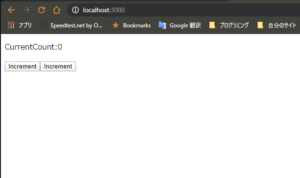
初期状態では、カウントは0になっている。
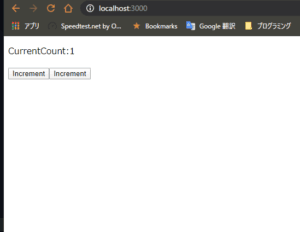
incrementボタンを押すと1カウントがプラスされる。
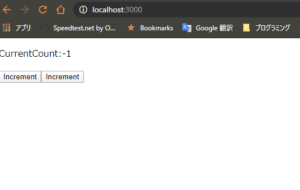
decrementを押すと1カウントがマイナスされる。
超絶シンプルなカウンタアプリになっている。
Action
まずEnumで今回のアプリで実装するActionを定義する。
incrementとdecrementだけだから、そのまま定義。
次に、InterfaceでActionの型を定義する。
今回はreduxライブラリのActionを継承したInterfaceを作っているが、Actionはtypeを持っているらしい。
最後にDispacherで使うためのAmountを実装する。
import {Action} from 'redux'


export enum    ActionNames{

   Increment = 'inc',

   Decrement = 'dec'

}


export interface IIncrement extends Action{

   type : ActionNames.Increment

}


export interface IDecrement extends Action {

   type : ActionNames.Decrement;

}


// 名前は何でもいい。IncrementでもIncでも。なんでも。

// 戻り値は上で定義したInterfaceを返すようにする。

// いわばActionCreatorといわれるやつ。

export const IncrementAmount = () : IIncrement => ({type : ActionNames.Increment});

export const DecrementAmount = () : IDecrement => ({type : ActionNames.Decrement});


export type ActionType = IIncrement | IDecrement;
Reducer
続いてReducerではactionに対する実装を書く。
また同時に画面でどのようなstateを持っているのかも書く。
今回の場合は、数字を増やしたりするだけなので、num一つだけ持っている。
またreducerの中のreturnで結構ミスをして、stateが変わらない!ってケースが多いから注意。
import {ActionNames, ActionType} from "../Actions/CounterAction";


export interface IState {

   num : number

}


const initialState : IState = {num: 0};


const CounterReducer = (state : IState = initialState , action : ActionType): IState => {

   switch (action.type) {

      case ActionNames.Increment:

         // 値が変わらない場合などはここでミスってる場合が多いから注意。

         return {num : state.num + 1};

      case ActionNames.Decrement:

         return {num : state.num - 1};

      default:

         return state;

   }

};


export default CounterReducer;
Store
storeはよくわからん。
今時点では、私も書き方を理解してないため、呪文のようにただただ覚えて書いている。
ただ、後ほど出てくるIndex.tsxのProviderコンポーネントのstoreに渡すためのstoreのオブジェクトを作るとは知っている。
私は今の時点では、こんなもんかーって感じ。
import {combineReducers,createStore,Action} from 'redux'

import CounterReducer, {IState} from "../Reducers/CounterReducer";

import {ActionType} from "../Actions/CounterAction";


const rootReducer = combineReducers(

   {CounterReducer}

   );


export default createStore(rootReducer);


export type ReduxState = {

   // ここでReducerの名前を正しく書かないとstateがバグる

   CounterReducer : IState

};


export type ReduxAction = ActionType | Action;
Container
コンポーネントの中で実装する関数を定義する?場所的な感じだと思う。
ここで定義した関数をコンポーネントで使えるようになる。
また、connectの中でいろいろしてるが、これも今は呪文的な感じで書いている。
コンポーネント内で使うpropsと紐づけるためにいろいろ書いている。と理解している。
import {ReduxAction, ReduxState} from "../Store/store";

import {DecrementAmount, IncrementAmount} from "../Actions/CounterAction";

import {connect} from "react-redux";

import {Dispatch} from "react";

import Counter from "./Counter";


export class ActionDispather{

   constructor(private dispatch: (action : ReduxAction) => void) {

   }


   public Increment() {

      this.dispatch(IncrementAmount())

   }


   public Decrement(){

      this.dispatch(DecrementAmount())

   }

}


export default connect(

   (state : ReduxState) => {

      return {value : state.CounterReducer}

},

   (dispatch : Dispatch<ReduxAction>) => ({actions : new ActionDispather(dispatch)})

)(Counter)
ちなみに下記の箇所は書き方がいっぱいある。
export class ActionDispatcher {
   constructor(private dispatch: (action: ReduxAction) => void) {}
パターン1
export class ActionDispatcher {
   dispatch : (action: ReduxAction) => void
   constructor(dispatch: (action: ReduxAction) => void) {
      this.dispatch = dispatch;
   }
パターン2
type dispatchType = (action: ReduxAction) => void

export class ActionDispatcher {
   dispatch : dispatchType;
   constructor(dispatch: dispatchType) {
      this.dispatch = dispatch;
   }
パターン3
type dispatchType = (action: ReduxAction) => void

export class ActionDispatcher {
   constructor(private dispatch: dispatchType) {
   }
なにをしているのか?
これは結局のところ型付けである。
actionという名前で、ReduxAction型を受け取り、戻り値がvoid型の関数という型を指定しているのである。
なので、この関数の型をtypeエイリアスに入れてしまえば結構楽になる。
Component
続いて、コンポーネント。
好きかって書いていいと思う。
が、Propsは上記のContainerのconnectで書いた型を受け付けるようInterfaceで宣言にしないといけない。
もちろんコンポーネントが上記で指定した型のpropsを受け取れるようにする。
import React from "react";

import {IState} from "../Reducers/CounterReducer";

import {ActionDispather} from "./Container";


interface Props {

   value : IState;

   actions : ActionDispather

}


class Counter extends React.Component<Props, {}>{


   render() {

      return (

         <div>

            <p>{this.props.value.num}</p>

            <button type={"button"} onClick={() => this.props.actions.Increment()}>Increment</button>

            <button type={"button"} onClick={() => this.props.actions.Decrement()}>Increment</button>

         </div>

      )

   }

}


export default Counter
Index.tsx
Indexはシンプル。
Providerで囲んで、さっき作ったstoreを渡すだけ。
どういう仕組みかは詳しく知らんが、これで動く。
import React from 'react';

import ReactDOM from 'react-dom';

import * as serviceWorker from './serviceWorker';

import {Provider} from "react-redux";

import store from "./Store/store";

import Counter from "./Component/Container";


ReactDOM.render(

  <Provider store={store}>

    <Counter />

  </Provider>,

  document.getElementById('root')

);


// If you want your app to work offline and load faster, you can change

// unregister() to register() below. Note this comes with some pitfalls.

// Learn more about service workers: https://bit.ly/CRA-PWA

serviceWorker.unregister();
Gitに上げてます!
このコードはGitのリポジトリに上げています。
私はTypescript×Reduxを学ぶときに、まずは動くアプリを目標にしました。
なぜならとりあえず動けば、いろいろなステータスを変えればどうなっているかわかるから。
ただネット上にはコンパイルエラーだの何かのエラーで動くコードがあるというのがまれで、結構な時間を消費した。
だから今回のアプリは実際に動く形としてGitに上げている。
- https://github.com/adaman3568/Typescriot-CounterApp/network/dependencies.git
以上。