 バイブス父さんの穴倉

[chatMain]さて今回はTypescriptでReduxを使っていたときのハマりについて書いていこうと思うよ![/chatMain]
[chatReply]プログラミングってハマりが多いっていうもんねー!どんなことではまったの?[/chatReply]
[chatMain]TypesrciptでReduxを使うときに、initialStateというのを使うんだけど、どうしてもこれがundefinedになってしまう!というハマりだよ![/chatMain]
[chatReply]なるほど![/chatReply]
ソースコードを解説
まず説明を始める前に、前提となるソースコードが分からないと話にならないので、早速ソースコードを書いていきます!
このアプリはめちゃくちゃシンプルなカウンタアプリです。
Action
まずはActionでこのアプリでのActionをEnumで定義します。
次にActionCreatorのインターフェースを書いていって、ActionCreatorの実態を書きます。
import {Action} from 'redux'

export enum	ActionNames{
	Increment = 'inc',
	Decrement = 'dec'
}

export interface IIncrement extends Action{
	type : ActionNames.Increment
}

export interface IDecrement extends Action {
	type : ActionNames.Decrement;
}

export const IncrementAmount = () : IIncrement => ({type : ActionNames.Increment});
export const DecrementAmount = () : IDecrement => ({type : ActionNames.Decrement});

export type ActionType = IIncrement | IDecrement;
Reducer
続いてReducerでは、上記ActionCreatorに対する処理を書きます。
今回はカウンタアプリなので、シンプルにnumというnumber型の値を持ったオブジェクトをいろいろ変更していきます。
Incrementが来ればプラス1をしますし、Decrementが来ればマイナス1します。
import {ActionNames, ActionType} from "../Actions/CounterAction";


export interface IState {
	num : number
}

const initialState : IState = {num: 0};

const CounterReducer = (state : IState = initialState , action : ActionType): IState => {
	switch (action.type) {
		case ActionNames.Increment:
			return {num : state.num + 1};
		case ActionNames.Decrement:
			return {num : state.num - 1};
		default:
			return state;
	}
};

export default CounterReducer;
Store
続いてStoreでは、後述するContainerで使うためのいろいろな定義を書いていきます。
正直私もここでやってること詳しくはわかりません。
まあReducerが今後増えてくることを想定して、combineReducerを使って、Reducerを一つにする。
また一つにしたReducerをCreateStoreを使って、IndexのProvoderのStoreの引数に投げるということは何となくわかります。
import {combineReducers,createStore,Action} from 'redux'
import CounterReducer, {IState} from "../Reducers/CounterReducer";
import {ActionType} from "../Actions/CounterAction";

const rootReducer = combineReducers(
	{CounterReducer}
	);

export default createStore(rootReducer);

export type ReduxState = {
	Counter : IState
};

export type ReduxAction = ActionType | Action;
Container
っで、Storeでいろいろ作った定義をContainerでいろいろしていきます。
カウンタアプリのコンポーネントの中で使うpropsと紐づける処理をしていて、その中身を把握しているのですが、あっているのでしょうか?
いずれにしても、ここで宣言する関数。IncrementとDecrementをカウンタアプリで使うと思っておけばいいかと思います。
また、connect関数を使って、後述するカウンタアプリのコンポーネントとこのContanerを紐づけます。
import {ReduxAction, ReduxState} from "../Store/store";
import {DecrementAmount, IncrementAmount} from "../Actions/CounterAction";
import {connect} from "react-redux";
import {Dispatch} from "react";
import Counter from "./Counter";

export class ActionDispather{
	constructor(private dispatch: (action : ReduxAction) => void) {
	}

	public Increment() {
		this.dispatch(IncrementAmount())
	}

	public Decrement(){
		this.dispatch(DecrementAmount())
	}
}

export default connect(
	(state : ReduxState) => {
		return {value : state.Counter}
},
	(dispatch : Dispatch<ReduxAction>) => ({actions : new ActionDispather(dispatch)})
)(Counter)
Component
で、カウンタアプリのコンポーネントです。
ここでは、ActionDiapatcherと名付けたクラスが、Propsを通じてくるので、それを使っています。
シンプルにActionDiapatcherで来る値をインターフェースで定義して、受け取る。それを使うって感じですね。
import React from "react";
import {IState} from "../Reducers/CounterReducer";
import {ActionDispather} from "./Container";

interface Props {
	value : IState;
	actions : ActionDispather
}


class Counter extends React.Component<Props, {}>{

	render() {
		return (
			<div>
				<p>CurrentCount:{this.props.value.num}</p>
				<button type={"button"} onClick={() => this.props.actions.Increment()}>Increment</button>
				<button type={"button"} onClick={() => this.props.actions.Decrement()}>Increment</button>
			</div>
		)
	}
}

export default Counter
Index
INDEXはめっちゃ簡単。
Counterを呼び出して、それをProviderが囲う。
そしてProviderのStoreにstore.tsで作ったstoreを投げる。
注意点はこの時呼ばれるCounterはコンポーネントのCounterではなく、ContainerのCounterということ。indexで気を付けるのはそれくらい。
import React from 'react';
import ReactDOM from 'react-dom';
import * as serviceWorker from './serviceWorker';
import {Provider} from "react-redux";
import store from "./Store/store";
import Counter from "./Component/Container";

ReactDOM.render(
  <Provider store={store}>
    <Counter />
  </Provider>,
  document.getElementById('root')
);

// If you want your app to work offline and load faster, you can change
// unregister() to register() below. Note this comes with some pitfalls.
// Learn more about service workers: https://bit.ly/CRA-PWA
serviceWorker.unregister();
Reduxでstateが undefinedに?どんな現象?
っで今回発生しているエラーはこんな内容。
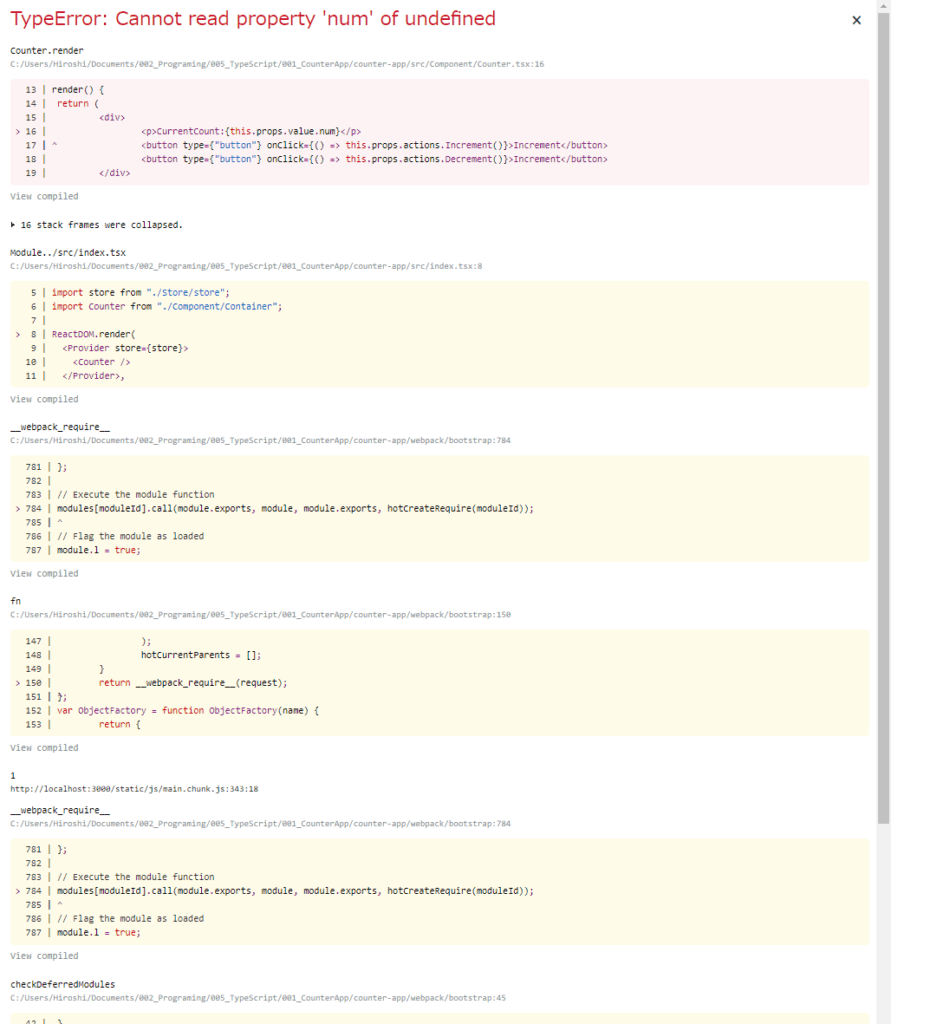
TypeError : Cannot read property ‘num’ of undefined。numとかいうプロパティなんてねえよ!!って話。
エラーの発生源は、CoutnerComponent
なのでrender関数の中身を下記のように変更して、propsの中身をconsole.logで見てみる。
	render() {
		return (
			<div>
				{/*<p>CurrentCount:{this.props.value.num}</p>*/}
				{console.log(this.props)}
				<button type={"button"} onClick={() => this.props.actions.Increment()}>Increment</button>
				<button type={"button"} onClick={() => this.props.actions.Decrement()}>Increment</button>
			</div>
		)
	}
すると、actionはしっかりと渡ってきているが、valueでundefinedになってわたってきていないことが判明。
そりゃundefinedのnumを取り出そうとしてもundefinedだわって感じ。
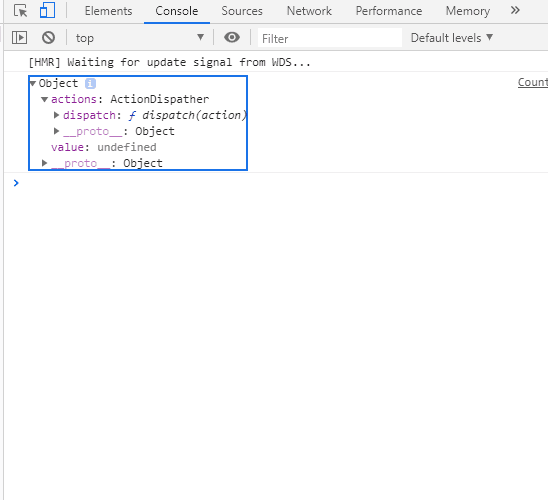
ContainerのMapstateの部分でどのような値が来てるか見てみる。
なので一度Containerのconnect部分でどのようなステータスが渡ってきているが見てみる。
とりあえず、renderのconsoleは削除しないとややこしいから、コメントアウトしておく。
	render() {
		return (
			<div>
				{/*<p>CurrentCount:{this.props.value.num}</p>*/}
				{/*{console.log(this.props)}*/}
				<button type={"button"} onClick={() => this.props.actions.Increment()}>Increment</button>
				<button type={"button"} onClick={() => this.props.actions.Decrement()}>Increment</button>
			</div>
		)
	}
っで、Containerのconnectにconsole.logを入れて、stateの中身がどうなっているか見てみる。
export default connect(
	(state : ReduxState) => {
		console.log(state);
		return {value : state.Counter}
},
	(dispatch : Dispatch<ReduxAction>) => ({actions : new ActionDispather(dispatch)})
)(Counter)
この状態にして実行すると。。。
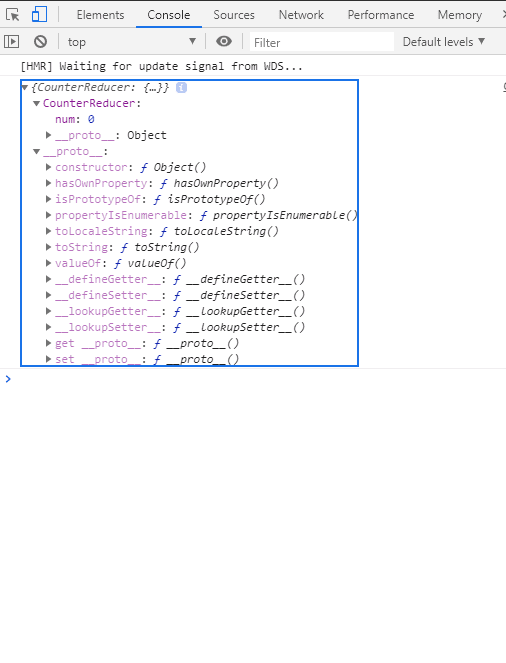
とりあえずこのタイミングでは、stateの中にnumという値が来ている。
が、注意すべきは、CounterReducerとなっていること。
connectで呼ばれるstateの型は、ReduxStateという型。
この時点で、ReduxStateが臭いとわかる。
export type ReduxState = {
	Counter : IState
};
見てみると、Counterという名前になっている。でも、Console.logでは、CounterReducerになっていた。
ん?一緒の名前にしないといけない感じ?
とりあえず同じ名前にしてみる。
export type ReduxState = {
	CounterReducer : IState
};
StoreのReduxStateを変更したので、忘れずにReduxStateを使っている箇所の修正をする。
export default connect(
	(state : ReduxState) => {
		console.log(state);
		return {value : state.CounterReducer}
},
あとconponentのコメントアウトも解除しておく
	render() {
		return (
			<div>
				<p>CurrentCount:{this.props.value.num}</p>
				{console.log(this.props)}
				<button type={"button"} onClick={() => this.props.actions.Increment()}>Increment</button>
				<button type={"button"} onClick={() => this.props.actions.Decrement()}>Increment</button>
			</div>
		)
	}
これで実行してみると下記のようになる。
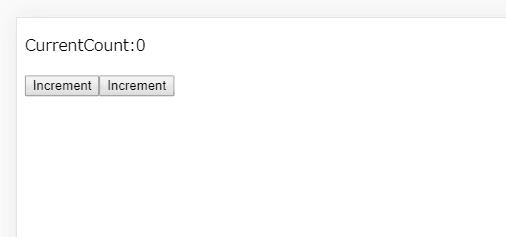
ちゃんと表示されている!
console.logも。。
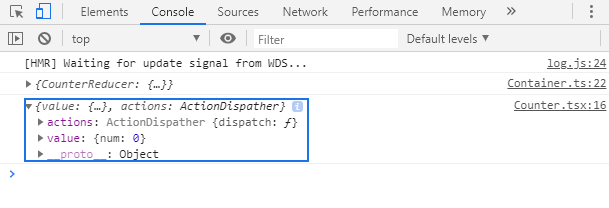
ちゃんとnumがとれている!
connectのタイミングでundefinedなら?
今回stateがundefinedとなるときに、もし下記のようなエラーの画面だったら?
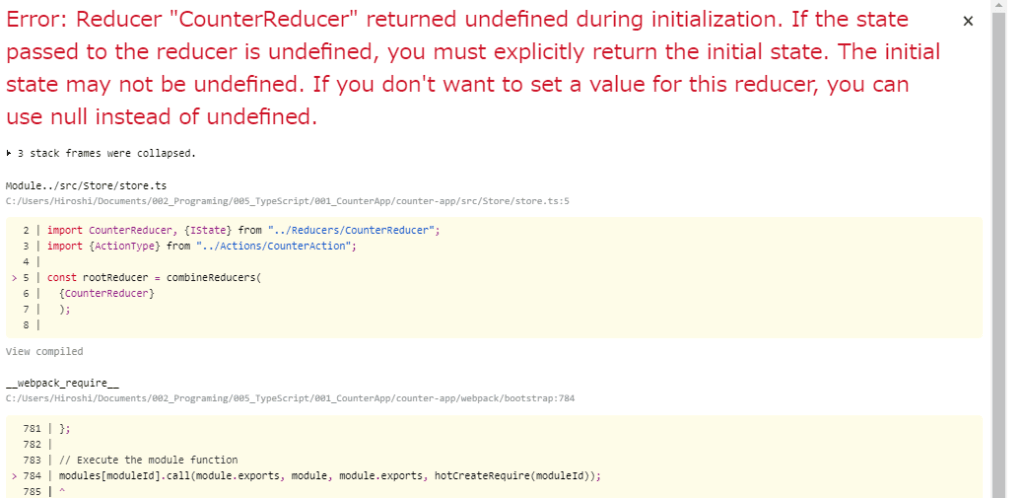
Reducerでdefaultの値を返していない可能性が高い。
基本的にReduxを使う場合い、ReducerでinisitalStateを定義し、defaultでそれを返すというのがポピュラーになっている。
下記のようにするとバグる。
const CounterReducer = (state : IState = initialState , action : ActionType): IState => {
	switch (action.type) {
		case ActionNames.Increment:
			return {num : state.num + 1};
		case ActionNames.Decrement:
			return {num : state.num - 1};
		// default:
		// 	return state;
	}
};
結果ReduxStateの名前をReducerと同じ名前にしないといけない
っで結局わかったのは、connectのStateの型をInterfaceで定義する際に、Reducerの名前を合わせないとバグるという点。
というかTypeScriptはコンパイル時のエラーにはめちゃくちゃ強いけど、実行時エラーは全くわからんって感じ。
だから、console.logとかを使って、デバッグをする技術を磨かんとあかんなーと思った。
今回のファイルはGitに上げてます。
もし今回の挙動を実際に動かしながら見てみたい人は、Gitに上げているのでCloneしてみてください。
- https://github.com/adaman3568/Typescriot-CounterApp/network/dependencies.git
cloneしてきたフォルダ直下で、yarn init ってコマンド打ってもらえればおそらく必要なライブラリは入るはず。
あとは、yarn startで実行できる。
yarnを入れていない人はこの機会にnpm から npn install yarn でyarnがインストールされるから使ってみるといいと思います。